
TroutRoutes: Trout Fishing App
onXmapsMaps & Navigation
3.3343.00 Reviews
- Version
- 5.15.0
- Installs
- 100.00K
- Age Rating
- Everyone
Screenshots
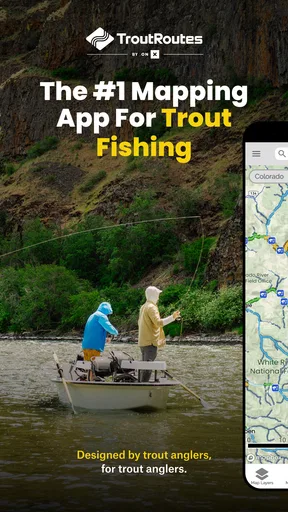
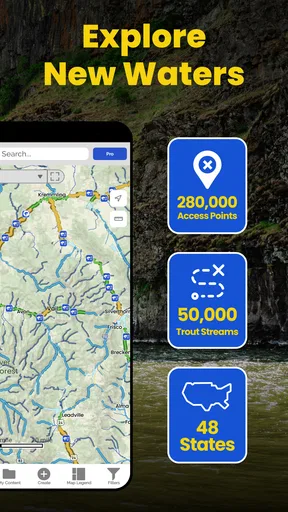
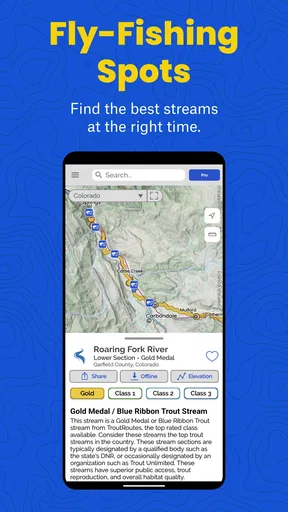
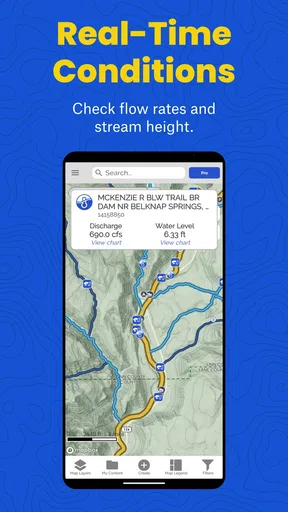
Our Review of TroutRoutes: Trout Fishing App
 Analysis by Appyee
I often plan a fishing outing with someone else: one person has the idea, another is checking the route, and both want to know whether a promising stretch is practical to reach. That is where TroutRoutes: Trout Fishing App makes sense to me. It is a maps and navigation app from onXmaps, built around finding trout water and local fly-fishing places rather than serving as a general-purpose road map. Its focus is useful when the question is not simply “How do we get there?” but “Which nearby water should we investigate?”
For a household sharing a phone or tablet, I would treat it as a planning aid, not a shared fishing log or a family-management tool. The person holding the device can explore the map and discuss options with everyone else, but I would not assume that a shared screen means separate personal accounts, saved preferences, or private trip histories. That distinction is worth settling before a group starts relying on one device.
One screen for choosing a day’s water
A realistic use for me would be a weekend morning when the weather or available time has narrowed the options. I could check TroutRoutes at home, compare nearby rivers and access points, then show the map to the people coming along. Rather than debating vague place names, we could agree on a stretch to investigate and keep a backup in mind if the first choice does not suit the day.
The app’s emphasis on maps, flow rates, and fishing locations gives that conversation a more useful starting point than a broad navigation app usually does. General map services are still better for ordinary driving directions, shops, and errands; TroutRoutes is the more specialized choice when trout water is the destination. I would use the two kinds of tools together rather than expect one to replace the other.
That specialized focus is also a sensible boundary for expectations. A mapped location can help me decide where to look, but it cannot make the choice for me or guarantee that the water will be right for my group on a particular day. I would check conditions close to departure and still use local judgment on arrival. A map is a planning layer, not a promise of a catch or a substitute for paying attention at the river.
Setting expectations before sharing a device
If a companion is going to browse on my phone, I would first agree on what we are doing with it: looking at candidate waters, navigating to one, or keeping the map available during the outing. That simple conversation avoids treating one person’s saved setup as a shared plan. If each angler wants independent planning, using their own device is the clearer arrangement, while a single screen works well for a quick group discussion.
I would also prepare before leaving a reliable connection. The published app description highlights map access, but offline availability should not be assumed for every map or detail just because a fishing trip may take us beyond dependable service. I would check what the current app makes available for offline use and test the chosen area before relying on it in the field. That is a practical precaution, especially when a companion expects the map to remain usable away from coverage.
There is a useful trade-off here: a detailed fishing map can make choosing a destination easier, but a phone is still a small screen and a shared device can be awkward when several people want to inspect different options. I would use it for narrowing choices and checking the route, then settle the plan before everyone is standing around waiting. For broad navigation or a group that wants to explore separate places at once, a standard mapping app or individual devices may be more convenient.
Age, trust, and who should use it
TroutRoutes is rated for Everyone, so its stated audience is not restricted to adults. In a household, I would still make the same distinction I make with any outdoor navigation tool: age suitability is not the same as readiness to plan or travel independently. A younger angler can explore options with an adult, while decisions about access, the route, and conditions should stay with whoever is responsible for the outing.
I would recommend it most to people who regularly look for trout streams or fly-fishing spots and want a more focused map than a general navigation app provides. Someone who fishes occasionally can still find it useful when planning a specific trip, but may not need a specialist tool for everyday directions. If the main need is turn-by-turn travel, nearby services, or a general map of town, a conventional navigation app is the better fit.
The app is free to install, with in-app purchases listed from $9.99 to $58.99 per item. I would explore the available experience before paying and consider whether its fishing-specific information is something I will use repeatedly. It has a 3.9 average from 561 ratings, with 309 written reviews, and more than 50K installs; I treat those as context rather than a substitute for deciding whether its maps match my own fishing habits. It is suitable for Everyone, was released on June 6, 2019, and its current version is 5.9.0, with Android 8.0 as the minimum operating-system requirement.
My household verdict is that TroutRoutes is most helpful when one person takes responsibility for researching trout water and the rest of the group joins in choosing a destination. It can make the planning conversation more concrete without turning the phone into the center of the outing. I would not choose it as a general navigation replacement, and I would not assume one shared device gives every angler a separate personal setup. For a group that fishes for trout often, though, its specialized focus is a practical reason to keep it in the planning mix.
Ever found yourself standing by a river, rod in hand, feeling a little lost about where to cast your line? Well, I’ve been there too. That’s why I was intrigued when I stumbled upon TroutRoutes: Trout Fishing App. This app promises to turn anyone into a trout-fishing aficionado with just a tap on their smartphone. But does it really live up to the hype? Let’s dive into it.
Getting Started with TroutRoutes
Once you download TroutRoutes, the first thing you’ll notice is how user-friendly it is. The interface is clean, which is always a plus in my book. You’re greeted with a map that’s just begging to be explored. It’s like having a treasure map, but instead of gold, it leads you to the best fishing spots for trout.
The app offers a handy tutorial for first-timers. Honestly, even if you’re not a tech wizard, you’ll find your way around without breaking a sweat. Trust me, if I can figure it out, anyone can. With just a few taps, you can set your location and start exploring the waters around you.
The Features That Hook You
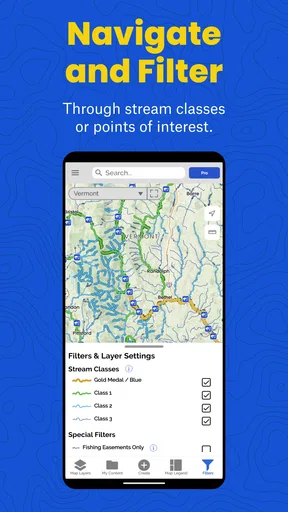
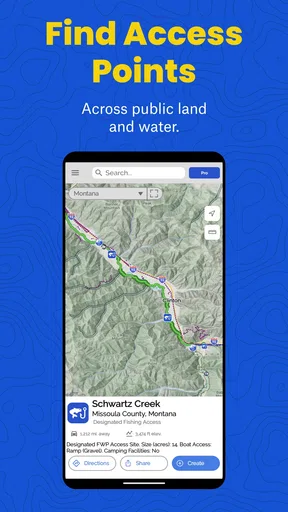
Now, let’s talk features. One of the coolest things about TroutRoutes is its detailed maps. These aren’t your average maps; they’re interactive and loaded with information. You get access to detailed river maps, public access points, and even the type of trout you’re likely to catch. It’s like having a fishing guide in your pocket!
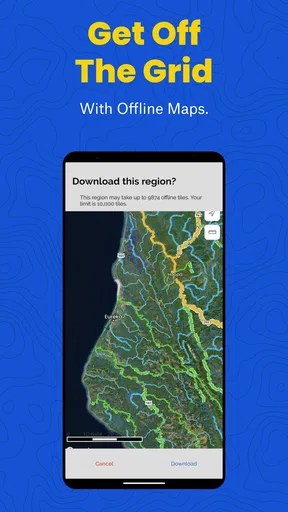
Another nifty feature is the ability to download maps for offline use. This is a game-changer for those of us who venture into areas where cell service is a bit sketchy. You can roam far and wide without worrying about losing access to your precious fishing data.
And let’s not forget the community aspect. You can connect with other anglers, share tips, and even post your catches. It adds a social element that makes the app feel more like a community than just a tool.
Why It’s a Reel Deal
So, what makes TroutRoutes stand out from other fishing apps? For starters, it’s incredibly detailed. The app offers layers of information that you can customize based on your preferences. Whether you’re interested in water conditions, nearby amenities, or seasonal patterns, it’s all there at your fingertips.
The app also updates regularly, which is crucial. You won’t have to worry about outdated info when planning your fishing trips. Plus, the customer support team is responsive and eager to help. It’s like having a personal assistant who’s as passionate about fishing as you are.
Final Cast
In the end, TroutRoutes really does reel you in with its comprehensive features and easy-to-use interface. Whether you’re a seasoned pro or just getting your feet wet in the world of trout fishing, this app has something for everyone. It transforms fishing trips into more than just a day by the river—it makes them an adventure.
If you’re ready to elevate your fishing game, give TroutRoutes a try. Who knows, it might just become your new favorite fishing companion. So grab your gear, download the app, and get ready to cast your line into a world of endless trout-fishing possibilities!
Verdict
Strengths of TroutRoutes: Trout Fishing App
- Comprehensive map coverage for planning.
- Offline maps for remote fishing spots.
- User-friendly interface with intuitive design.
- Detailed stream data and access points.
- Community-driven updates enhance accuracy.
Limitations of TroutRoutes: Trout Fishing App
- Limited international coverage available.
- Requires subscription for premium features.
- Occasional map loading delays reported.
- Not compatible with older device models.
- Lacks real-time weather integration.
Other Releases by onXmaps
View All
onX Hunt: Offline Hunting Maps
Sports4.5

onX Offroad: Trail Maps & GPS
Maps & Navigation4.8

onX Backcountry Trail Maps GPS
Sports4.3

onX Fish: Midwest Fishing App
Sports4.8
Similar Picks in This Category
View All
Uber - Request a ride
Uber Technologies, Inc.4.7


inDrive. Rides with fair fares
® SUOL INNOVATIONS LTD4.8

Yandex Go: Taxi Food Delivery
Mikromobilnost LLC Belgrade4.8

Bolt: Request a Ride
Bolt Technology4.8

Rapido: Bike-Taxi, Auto & Cabs
Rapido Bike Taxi4.8
Frequently Asked Questions
What features does TroutRoutes offer for planning fishing trips?
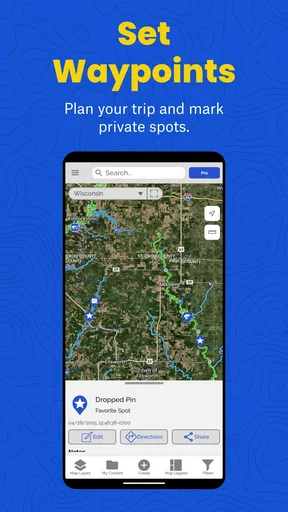
TroutRoutes provides an extensive map of trout streams across the United States, with detailed access points, public land boundaries, and real-time stream conditions. The app includes features like offline maps, GPS location tracking, and the ability to mark favorite spots. This makes it a comprehensive tool for planning and navigating fishing trips.
Is TroutRoutes available for both Android and iOS devices?
Yes, TroutRoutes is available for both Android and iOS platforms. The app can be downloaded from the Google Play Store for Android users and the Apple App Store for iOS users. This ensures that anglers using different types of devices can access the app's features seamlessly.
Does TroutRoutes require an internet connection to function?
TroutRoutes offers offline map capabilities, which means you can download maps for areas you'll be visiting and access them without an internet connection. This feature is particularly useful in remote fishing locations where cellular service may be unreliable or unavailable.
Are there any subscription fees or in-app purchases in TroutRoutes?
TroutRoutes operates on a freemium model. While basic features are available for free, there are premium subscriptions that unlock additional features such as advanced map layers, more detailed stream data, and enhanced offline capabilities. It's worth checking the app for the latest pricing and subscription options.
How does TroutRoutes ensure the accuracy of its stream and access point information?
TroutRoutes sources its data from a combination of government databases, public records, and user contributions. The app regularly updates its maps and access points to ensure accuracy. Users can also contribute by reporting any discrepancies or new access points, helping to improve the app's reliability and usefulness.
